
Minecraft server administrators know the frustration of lag spikes, crashes, and angry players when events are poorly scheduled. Inefficient task management causes servers to choke under load, ruining the multiplayer experience you worked hard to build. Proper event scheduling transforms server performance by distributing tasks intelligently, preventing bottlenecks, and keeping gameplay smooth. This guide walks you through essential preparation steps, practical scheduling methods using modern tools, common pitfalls to avoid, and verification techniques that ensure your server runs at peak efficiency. Master these fundamentals and watch your server stability soar.
Table of Contents
- Choosing The Right Server Base For Optimized Scheduling
- Step-By-Step Guide To Scheduling Minecraft Events With PySpigot
- Common Pitfalls And How To Troubleshoot Scheduled Events
- Verifying Scheduled Events And Measuring Server Performance Impact
- Enhance Your Minecraft Server With Custom Plugins
- Frequently Asked Questions
Key takeaways
| Point | Details |
|---|---|
| Synchronous vs asynchronous tasks | Synchronous tasks run on the main thread and can cause lag, while asynchronous tasks run separately to maintain smooth gameplay. |
| Server base selection matters | Paper delivers 10-30% better performance than Spigot, with Purpur adding even more optimization and customization options. |
| Task cancellation prevents crashes | Using stopTask(task) frees resources and prevents memory leaks that lead to server instability. |
| Ticks control timing precision | Minecraft runs at 20 ticks per second, and delays or intervals specified in ticks give you exact control over event execution. |
| Thread blocking kills performance | Heavy operations on the main thread freeze gameplay, so long or repeated events must run asynchronously. |
Understanding Minecraft server task scheduling basics
Before you schedule your first event, you need to grasp how Minecraft servers handle tasks. Understanding the difference between synchronous and asynchronous tasks is crucial for efficient server performance. Synchronous tasks execute on the main server thread, which means they can directly interact with the game world, modify blocks, teleport players, or spawn entities. The catch? If a synchronous task takes too long, it blocks everything else, causing lag spikes that frustrate players.
Asynchronous tasks run on separate threads, completely independent of the main game loop. They handle background work like database queries, file operations, or API calls without freezing gameplay. You cannot safely modify the game world from an async task, but you can process data and then schedule a quick synchronous task to apply changes. This separation keeps your server responsive even during heavy processing.
Ticks are the heartbeat of Minecraft. The server runs at 20 ticks per second under ideal conditions, meaning each tick lasts 50 milliseconds. When you schedule a task with a delay of 100 ticks, it executes after 5 seconds. Intervals work the same way for repeating tasks. A task set to repeat every 20 ticks runs once per second. Understanding tick timing lets you synchronize events precisely with game mechanics.
Delay parameters tell the scheduler how many ticks to wait before starting a task. Interval parameters control how often a repeating task executes. Combining these gives you fine control over event timing. You might schedule a reminder message every 600 ticks (30 seconds) or trigger a minigame event after a 6000 tick (5 minute) delay.
Choosing async tasks for lengthy or repeated operations maintains smooth gameplay. Database writes, complex calculations, and network requests belong in async tasks. Quick world modifications and player interactions need synchronous execution. Master this distinction and your server will handle events gracefully even under heavy load.
- Synchronous tasks run on the main thread and can modify the game world directly
- Asynchronous tasks run separately and prevent blocking the server during long operations
- 20 ticks equal 1 second of real time in Minecraft
- Delays and intervals measured in ticks provide precise timing control
- Long operations must run async to avoid lag spikes
Choosing the right server base for optimized scheduling
Your server base directly impacts how efficiently you can schedule events. Spigot pioneered the plugin API that most servers use today, offering maximum compatibility with legacy plugins. However, Spigot prioritizes compatibility over performance, making it the slowest option for modern servers. Its vanilla-like behavior means you get basic scheduling functionality without optimization.
Paper is a fork of Spigot that brings many optimizations and fixes while remaining compatible with Spigot/Bukkit plugins. Paper outperforms Spigot by 10-30% in most scenarios through improved chunk loading, entity tracking, and task scheduling. The performance gains come from rewritten core systems that reduce unnecessary calculations. For most administrators, Paper strikes the perfect balance between compatibility and speed.
Purpur builds on Paper's optimizations and adds even more performance tweaks plus gameplay features. Purpur is a fork of Paper geared toward extensive customization, letting you fine-tune nearly every aspect of server behavior. The additional performance improvements help with event scheduling under extreme loads. Purpur shines when you need advanced customization alongside top-tier performance.
Paper delivers the best balance for most servers scheduling tasks efficiently. You get significant performance improvements over Spigot without sacrificing plugin compatibility. The optimized scheduler handles more concurrent tasks smoothly. Purpur makes sense if you want bleeding-edge performance and enjoy tweaking every server setting.

Pro Tip: Start with Paper for reliable performance gains, then migrate to Purpur only if you need its advanced customization options or host a large network pushing hardware limits.
| Server Base | Performance | Compatibility | Customization | Best For |
|---|---|---|---|---|
| Spigot | Baseline | Highest | Limited | Legacy servers, maximum plugin compatibility |
| Paper | 10-30% faster | High | Moderate | Most servers, balanced performance and compatibility |
| Purpur | 15-35% faster | High | Extensive | Advanced administrators, large networks, custom gameplay |
Step-by-step guide to scheduling Minecraft events with PySpigot
PySpigot simplifies event scheduling through its task manager API. PySpigot provides a task manager that allows developers to schedule synchronous and asynchronous tasks, including repeating tasks and tasks with callbacks. The clean interface makes scheduling straightforward even for complex event chains.
Scheduling a synchronous task with runSyncCallbackTaskLater requires three parameters: the callback function, the delay in ticks, and optional callback arguments. The task waits for the specified delay, then executes your function on the main thread. This works perfectly for delayed world modifications like opening doors, spawning mobs, or teleporting players after a countdown.
- Import the task manager from PySpigot's managers module
- Define your callback function that contains the event logic
- Call runSyncCallbackTaskLater with your function, delay in ticks, and any arguments
- Store the returned task ID if you need to cancel it later
- Test the timing by logging execution to verify correct delay
Scheduling asynchronous repeating tasks with scheduleAsyncRepeatingTask follows a similar pattern but adds an interval parameter. The first delay controls when the task starts, while the interval determines how often it repeats. Use this for background processing like leaderboard updates, backup operations, or periodic cleanup tasks that should never block gameplay.
Stopping scheduled tasks prevents resource leaks and unwanted behavior. The stopTask(task) function is used to cancel a scheduled task. Pass the task ID you received when scheduling, and PySpigot immediately cancels execution. Always cancel tasks when plugins disable, minigames end, or conditions change. Failing to cancel repeating tasks creates memory leaks that slowly degrade performance.
Parameters control task behavior precisely. Delay specifies how many ticks to wait before first execution. Interval controls spacing between repetitions for repeating tasks. Callback functions contain your event logic and receive any arguments you passed during scheduling. Understanding these parameters lets you orchestrate complex event sequences.
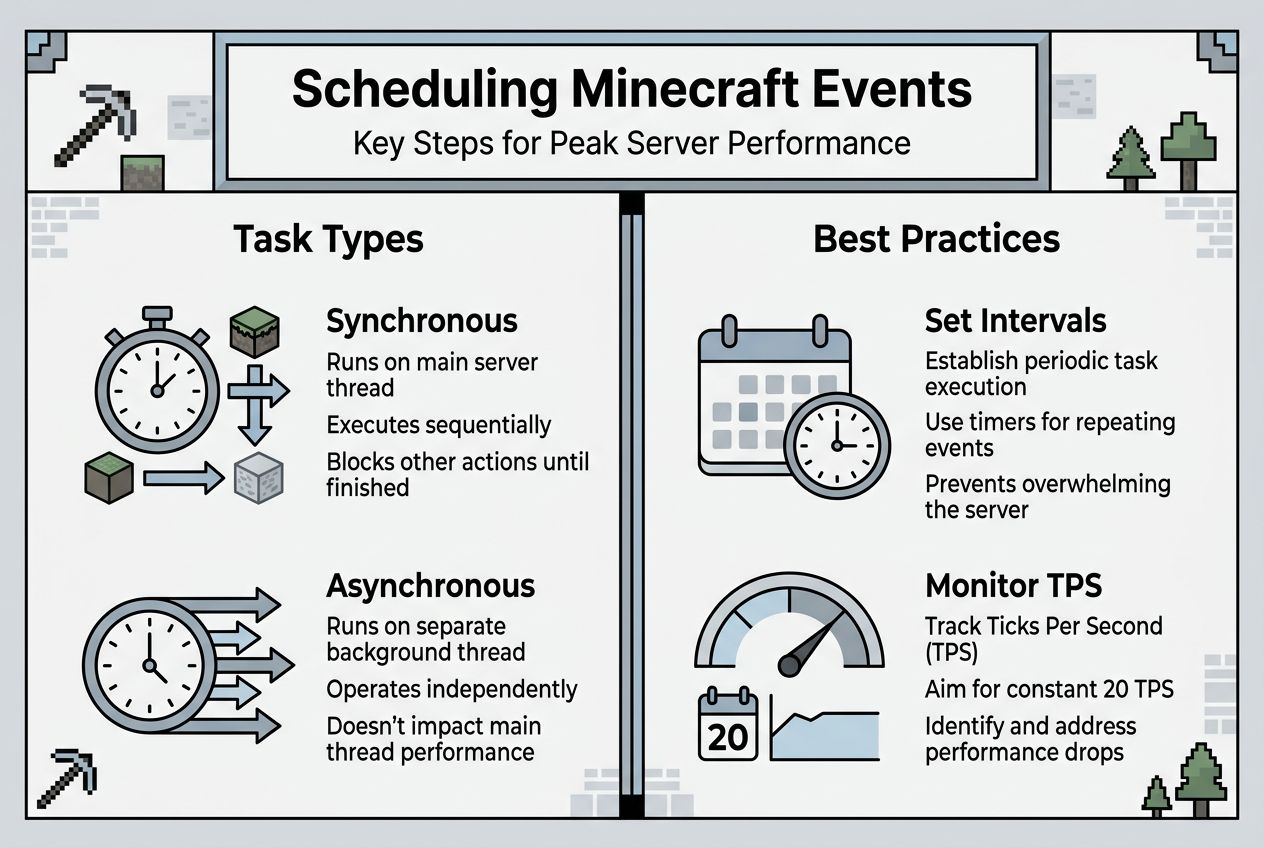
Pro Tip: Choose delays and intervals carefully to avoid server overload. Running heavy tasks every tick (interval of 1) will crush performance. Start with longer intervals like 100 or 200 ticks and decrease only if needed.
| Function | Task Type | Use Case | Parameters |
|---|---|---|---|
| runSyncCallbackTaskLater | Synchronous, one-time | Delayed world modifications, teleports, spawns | callback, delay, args |
| scheduleAsyncRepeatingTask | Asynchronous, repeating | Background processing, updates, cleanup | callback, delay, interval, args |
| stopTask | Cancellation | Stop any scheduled task | task_id |
Common pitfalls and how to troubleshoot scheduled events
Blocking the main thread with heavy synchronous tasks causes the most common performance problems. When a sync task takes longer than 50 milliseconds (one tick), the entire server lags. Players experience rubber-banding, delayed block breaking, and choppy movement. Common pitfalls include inefficient task scheduling, leading to server lag, and improper thread management, causing crashes. Always profile your synchronous tasks and move heavy processing to async execution.
Using async tasks for long or frequent events prevents blocking. Database queries, file I/O, web requests, and complex calculations belong in async tasks. Even seemingly quick operations add up when repeated frequently. A task that takes 10 milliseconds becomes a problem when scheduled every tick. Move it async and schedule a brief sync task only when you need to apply results to the game world.
Monitoring task durations reveals performance bottlenecks. Log execution time for critical tasks and watch for patterns. If a task consistently takes longer than expected, optimize the logic or break it into smaller chunks. Adjust intervals based on actual performance rather than guessing. A task scheduled every 20 ticks might run fine at 40 ticks with no loss of functionality.
- Forgetting to cancel tasks when they are no longer needed creates memory leaks
- Missing error handling in callbacks leads to silent failures and confusing bugs
- Scheduling too many tasks simultaneously overwhelms the scheduler
- Mixing sync and async operations incorrectly causes thread safety issues
- Hard-coding delays instead of using configuration makes tuning difficult
Pro Tip: Use logging and error callbacks to catch issues early. Wrap task logic in try-except blocks and log exceptions with stack traces. This reveals problems during testing before players encounter them.
Critical Note: Thread safety matters when sharing data between sync and async tasks. Never modify game world objects from async threads. Use thread-safe data structures or schedule a sync task to apply changes. Poor thread management causes random crashes that are nearly impossible to debug.
Verifying scheduled events and measuring server performance impact
Verification starts with logging task execution at key points. Log when tasks start, complete successfully, or encounter errors. Include timestamps and task IDs to track execution flow. This creates an audit trail showing whether events fire on schedule and complete as expected. Without logging, you are flying blind.
Testing strategies should cover different loads and intervals. Start with a single task and verify correct timing. Add more tasks gradually while monitoring performance. Test edge cases like rapid task cancellation, overlapping executions, and server restarts. Load testing reveals problems that only appear under realistic conditions.
Server performance metrics tell you whether scheduling changes help or hurt. TPS (ticks per second) should stay at 20 under normal load. CPU usage shows processing overhead from scheduled tasks. Memory usage reveals leaks from uncanceled tasks. Track these metrics before and after implementing new scheduling to measure actual impact.
- Log task start, completion, and errors with timestamps for audit trails
- Test with increasing loads to find performance limits
- Monitor TPS, CPU, and memory to measure scheduling impact
- Compare metrics before and after changes to verify improvements
- Use profiling tools to identify which tasks consume the most resources
| Metric | Before Optimization | After Optimization | Impact |
|---|---|---|---|
| Average TPS | 18.5 | 19.8 | Smoother gameplay |
| CPU Usage | 75% | 60% | More headroom for players |
| Memory Usage | 6.2 GB | 5.8 GB | Reduced leak risk |
Plugins like Spark, Timings, and LagMonitor provide detailed performance insights. Spark profiles task execution and identifies bottlenecks. Timings breaks down where server time goes, highlighting expensive operations. LagMonitor tracks TPS history and alerts you to performance degradation. Install at least one monitoring tool to make informed optimization decisions.
Pro Tip: Test incrementally to isolate scheduling impact. Change one task at a time, measure performance, then move to the next. Bulk changes make it impossible to identify which modification caused improvements or regressions.
Enhance your Minecraft server with custom plugins
Mastering event scheduling lays the foundation for a high-performance server, but custom plugins take your multiplayer experience to the next level. WyZ specializes in crafting optimized Minecraft plugins for Paper servers using Kotlin and Maven, targeting version 1.21 and above. Whether you need automated event schedulers, PvP systems, economy management, or custom game mechanics, professional plugins integrate seamlessly with your existing setup.
Custom plugins automate complex scheduling tasks that would take hours to code manually. WyZ delivers clean, efficient code with quick turnaround times, letting you focus on building your community rather than debugging scripts. From anti-cheat modules to guild management systems, the right plugins transform how your server handles events and player interactions. Explore the portfolio of proven solutions and discover how professional Minecraft plugins can elevate your server's performance and player satisfaction.
Frequently asked questions
How do I choose between synchronous and asynchronous tasks in Minecraft event scheduling?
Use synchronous tasks for quick operations that must run on the main thread, like modifying blocks, teleporting players, or spawning entities. These tasks directly interact with the game world but will cause lag if they take too long. Use asynchronous tasks for longer or repeated events such as database queries, file operations, or complex calculations that do not need immediate world access. This prevents blocking the server and maintains smooth gameplay even during heavy background processing.
What are ticks and why do they matter in scheduling?
Ticks are the fundamental time units in Minecraft, with the server running at 20 ticks per second under ideal conditions. Each tick represents 50 milliseconds of game time. Scheduling delays and intervals are specified in ticks to precisely control timing, so a delay of 100 ticks equals 5 seconds and an interval of 20 ticks means the task repeats once per second. Understanding tick timing lets you synchronize events perfectly with game mechanics and player actions.
Can I cancel a scheduled task after it's started?
Yes, using stopTask(task) you can cancel any scheduled task anytime by passing the task ID returned during scheduling. This immediately stops execution and frees resources, preventing memory leaks and reducing server crashes. Always cancel tasks when plugins disable, minigames end, or conditions change to maintain optimal performance and avoid unwanted behavior from orphaned tasks.
Why should I prefer Paper or Purpur over Spigot for my server?
Paper and Purpur offer 10-30% better performance and improved stability over Spigot through optimized core systems. They provide better task scheduling efficiency with rewritten chunk loading, entity tracking, and event handling that reduces unnecessary calculations. Paper maintains full plugin compatibility while delivering significant speed gains, and Purpur adds even more performance tweaks plus advanced customization options for administrators who want fine-grained control over server behavior.